How to organize your computer desktop
A desktop full of files slows you down every time you look for something. A few folders and a five-minute weekly habit fix it for good.
The short answer: move everything off the desktop into one "Sort" folder, keep only 4 to 6 folders for what you are working on now, sweep it every Friday, and use a wallpaper with labelled sections so each folder has a home you can see.
1. Clear it in five minutes
Don't sort file by file. Make a folder called Sort, select everything on the desktop (Ctrl+A on Windows, Cmd+A on a Mac) and drag it in. Your desktop is clean now; the sorting can wait until you need something.
2. Keep only what's active
The desktop is for now, not for storage. Make 4 to 6 folders for current work, for example:
- Inbox: new downloads and screenshots land here.
- This week: the files you are using right now.
- One per project, class or client you are working on.
- To file: finished things that need to go in Documents.
Everything else belongs in Documents, Pictures or cloud storage, in folders by year or by area.
3. Give each folder a home
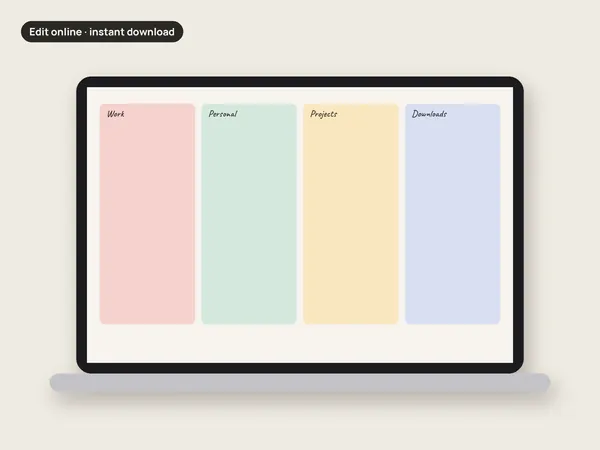
A desktop organizer wallpaper divides the screen into labelled, colored sections: Work, School, Projects, Photos, To do. Drag each folder into its section. Because the labels are part of the picture, the order stays even after a restart, and anything out of place stands out.
- Students: one section per subject.
- Freelancers: one section per client, plus Invoices.
- Home: Bills, Photos, Family, Travel.
4. Setting the wallpaper
- Windows: right-click the PNG and choose Set as desktop background.
- Mac: System Settings, Wallpaper, Add Photo, choose the PNG, and set it to Fill Screen.
Make the wallpaper at your screen's exact size so the sections don't stretch. Windows: Settings, System, Display, Display resolution. Mac: Apple menu, About This Mac, More Info, Displays.
5. Keep it tidy
- Every Friday: empty the Inbox and To file folders. Five minutes.
- Change your browser's download folder to the Inbox, so downloads stop landing everywhere.
- On Windows, switch on Storage Sense to clear old downloads automatically; on a Mac, Stacks (right-click the desktop, Use Stacks) groups loose files by type.
- Once a month, open the Sort folder and delete what you haven't needed.
Make your organizer
The desktop wallpaper organizer lets you choose your screen size, 2 to 8 sections, their names and colors, and a photo behind them, and downloads a PNG at the exact size. For planning the week itself, see the 2027 digital planners; for the phone, the free phone wallpaper maker.